How to create a professional invoice: the complete guide
A good invoice does three jobs: it tells your client exactly what they owe, makes paying you effortless, and gives you a clean record for the day someone asks questions. This guide covers all three, from the fields every invoice needs to reminders, tax, currencies and the tools worth using.
Why a good invoice gets paid faster
Most late payments are not caused by clients who refuse to pay. They are caused by invoices that create friction: a missing purchase order number, a total nobody can reconcile with the quote, bank details buried in an old email thread, a due date that never registered. Each of those gives a finance team a reason to set your invoice aside and deal with it "later," and later has a habit of turning into next month.
A professional invoice removes those reasons. It is complete enough that someone in accounts payable can process it without writing back to you, clear enough that the person who approved the work recognizes it at a glance, and specific about how and when to pay. That is all "professional" needs to mean. It has little to do with decoration, although a clean layout does help a client trust what they are reading.
There is a second reason to get this right: your invoices are your records. When you file taxes, apply for a loan, settle a dispute or sell the business, the trail of invoices is the evidence that the work happened and the money moved. Inconsistent numbering and missing dates create work for you months or years later, when you least want it.
This guide follows the order you meet things in practice: what goes on an invoice, how to number and date it, how to handle tax and currency, how to get paid, how to deal with late payers, and how to choose the software that produces all of it. Where local rules differ, we say so, because invoicing requirements vary by country. Treat this as general guidance rather than tax or legal advice, and confirm specifics with a local accountant.
The short version
A professional invoice has your business name and contact details, your client's name and billing address, a unique invoice number, an issue date and a due date, an itemized description of the work with quantities and rates, a subtotal, tax and total in a clearly stated currency, exact instructions for how to pay, and your payment terms. Everything else in this guide is detail on those eight things.
What an invoice is, and what it is not
An invoice is a document that requests payment for goods or services you have delivered, or agreed to deliver, and records the details of that sale. It does two jobs at once: it asks for money, and it documents a transaction.
It is not a contract. A contract or proposal sets out what you agreed to do and on what terms; the invoice applies those terms to a specific piece of work. It is also not a receipt, which confirms that payment has arrived. In practice one document often becomes both, marked "paid" once the money lands, but the two have different purposes, and we separate them further down.
Three different readers look at every invoice, and it helps to write for all of them. Your client's approver wants to see that the invoice matches what they ordered. Their accounts team wants clean data: a number, a date, a total, a way to pay. And a tax authority, if it ever asks, wants a consistent record that supports what you reported. An invoice that satisfies all three rarely causes trouble.
In many countries an invoice that charges VAT, GST or a similar consumption tax must contain specific fields to count as a valid tax invoice, and a missing one can cause your client problems when they try to reclaim the tax. In other places, and for businesses that do not charge tax, the rules are looser. Either way, the field list in the next section is a safe baseline.
The anatomy of a professional invoice
Every field below earns its place. Figure 1 shows where each one sits on the page, and the sections after it explain what to put there and why.
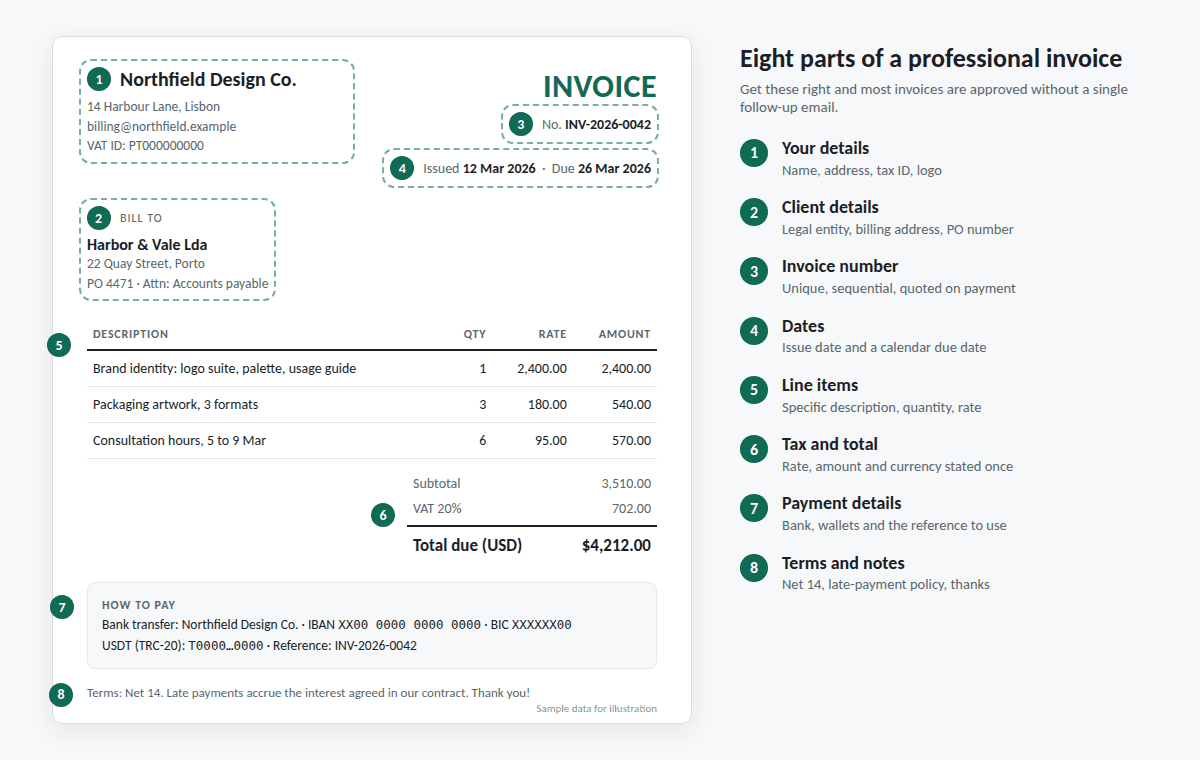
1. Your business details
Use the name your client's records will match. If you invoice through a company, use the registered company name, not a brand nickname. Add a mailing address, an email address for billing questions, and your tax or VAT registration number if you have one. A logo is optional but worth adding: it lets a client recognize the invoice in a stack of others.
2. Your client's details
Use the full legal name and billing address of the entity that pays, which is not always the person who hired you. Then ask two questions before the first invoice: who should receive it, and does the company need a purchase order number, project code or cost center printed on it? Getting this right at the start is the cheapest way to avoid weeks of delay.
3. Invoice number
Every invoice needs a unique identifier, and a sequential scheme is best. It gives the client something to quote when they pay and gives you a way to find any document in seconds. We cover numbering rules in the section on numbers, dates and payment terms.
4. Dates
Show the issue date and the due date, both. If the work was delivered over a period, or on a date that differs from the issue date, add that too, since some tax systems ask for the date of supply. Write dates in an unambiguous format such as "12 Mar 2026," because 03/12/2026 means two different days depending on the reader's country.
5. Line items
List each item or service with a description, a quantity, a unit price and a line total. This is where invoices are most often approved or questioned, so the wording matters. We give examples below.
6. Subtotal, tax and total
Show the subtotal, any discount, the tax with its rate and label (for example "VAT 20%"), and the total due. State the currency once, clearly, and use it everywhere on the page. If a deposit has been paid, show it as a deduction so the balance due is unmistakable.
7. Payment details
Do not make the client hunt for how to pay you. Put the bank details, wallet addresses or payment link on the invoice itself, plus the reference you want them to include. An invoice that cannot be paid from the page in front of the client generates an email, and an email generates a delay.
8. Terms and notes
State the payment terms (for example "Net 14"), any late-payment policy, and anything else that belongs on the record, such as a validity period on a quote or a line thanking the client. Short is better. Long legal text belongs in your contract; the invoice just points back to it.
Quote, invoice, receipt, credit note: which document and when
Four documents cover almost every stage of a sale, and mixing them up is a common source of confusion. Figure 2 shows how they relate.
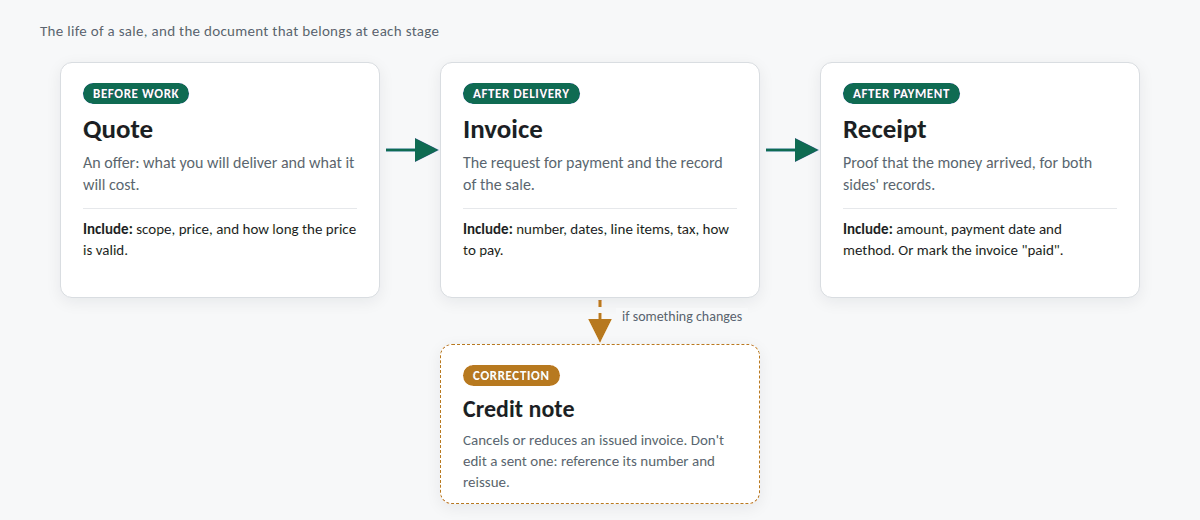
A quote (or estimate) comes before the work. It states what you will deliver and what it will cost, and it should say how long the price is valid, typically 14 to 30 days. A quote is an offer, so once the client accepts it, your invoice should match it line for line. If the scope changes, say so on the invoice and explain the difference.
An invoice comes after delivery, or at agreed milestones. It is the request for payment and the record of the sale.
A receipt comes after payment. It confirms the amount received, the date and the method. Plenty of businesses simply mark the original invoice "paid" and send that back, which works well as long as it shows the payment date.
A credit note corrects an invoice you have already issued: you overcharged, a service was cancelled, or a client returned something. Do not quietly edit a sent invoice. The client's accounts team has already booked the original figures, so the clean fix is a credit note that references the original invoice number, followed by a new corrected invoice if needed. That keeps a visible trail for both sides and for any later audit.
Invoice numbers, dates and payment terms
Numbering that will still make sense in five years
Choose a format on day one and stick to it. A year prefix plus a running counter works well: INV-2026-0001, INV-2026-0002, and so on. Give quotes their own series (Q-2026-0001) so the two never collide. Three habits keep the record clean:
- Never reuse a number. If you create an invoice by mistake, keep it, mark it void, and move on to the next number.
- Avoid gaps where you can. Some tax authorities expect an unbroken sequence, and even where they do not, a gap invites questions.
- Keep one sequence per business identity. If you invoice under two trading names or entities, give each its own series.
Issue date, due date and the date the work was done
The issue date is the day you send the invoice. The due date is the day payment is expected, and it should appear as an actual calendar date, not only as "Net 30." Spelling it out removes arguments about when the clock started. Send the invoice promptly: invoicing the day the work is accepted, rather than at the end of the month, pulls your payment date forward by weeks at no cost.
Choosing payment terms
Payment terms tell the client how long they have. The common choices are:
- Due on receipt. Best for small jobs, new clients, and digital goods.
- Net 7 or Net 14. Reasonable for freelancers working with small businesses and individuals.
- Net 30. A widespread default for companies with an accounts payable process. Larger organizations sometimes run 45 or 60 day cycles.
"Net 30" means payment is due 30 days after the invoice date. Agree the terms before you start work, write them into the contract or quote, and repeat them on every invoice. Asking for shorter terms up front is far easier than renegotiating after you have delivered.
Line items: describing your work so it gets approved
A line item does one job: it lets the person approving the invoice match it to something they remember ordering. Vague descriptions force them to ask, and asking takes days. Specific ones let them approve in seconds.
| Vague | Specific |
|---|---|
| Design work | Brand identity: logo suite, color palette and usage guide (approved 4 Mar) |
| Consulting | Checkout funnel review, 6 hours at $95, 5 to 9 Mar |
| Development | Website build, milestone 2 of 3: product pages and cart |
| Expenses | Stock photography license, 3 images (receipt attached) |
A few more rules of thumb:
- Use a quantity and a unit price even for fixed fees. "1 × $2,400" reads as clean as "6 × $95," and it keeps every row in the same format.
- Itemize expenses separately from fees, attach receipts where the client expects them, and decide any markup before you spend the money, not after.
- Show discounts as their own line rather than lowering the unit price. The client sees your normal rate and the value of the concession, which protects the price for the next job.
- Reference the source. A quote number, purchase order number or contract reference on the line lets the client's system match the invoice automatically.
Tax on invoices: the basics
Tax rules differ enormously between countries and even between states, so this section covers the concepts that stay constant and leaves the specifics to your accountant.
Consumption taxes such as VAT, GST and sales tax are collected from the customer on behalf of the government. Whether you must charge one depends on where you are registered, what you sell, where the customer is, and whether your turnover is above a registration threshold. If you charge tax, the invoice should show the rate, the amount, and your tax registration number. If you do not charge it, some jurisdictions still expect a short note explaining why, such as "not VAT registered."
Tax-exclusive and tax-inclusive prices
The single most common calculation error on invoices is mixing up these two. Take a 20% tax rate:
- Tax-exclusive: your fee is $100. Tax is $20. The client pays $120.
- Tax-inclusive: the client pays $120, and that price already contains the tax. To find the tax, divide by 1.2 to get the $100 net figure, leaving $20 as tax. Taking 20% of $120 gives $24 and produces the wrong net amount.
Decide which one your quote used and keep the invoice consistent with it. Consumer-facing prices are often inclusive; business-to-business prices are usually exclusive.
Mixed rates and cross-border sales
If one invoice contains items taxed at different rates, tax each line at its own rate and show the tax by rate. For clients in other countries, some tax systems apply a "reverse charge" to certain business services, meaning the customer accounts for the tax instead of you, and the invoice carries a specific statement instead of a tax amount. Whether that applies to you depends on both countries' rules, so check before assuming a zero rate. The guide to invoicing international clients goes further into the practical side.
Finally, remember that your invoices feed your own income reporting. If you invoice in a foreign currency, keep a note of the exchange rate you use to convert the amount for your books, since tax authorities usually want the figure in your local currency.
Currency and invoicing across borders
The currency on an invoice decides who carries the exchange-rate risk. Invoice in your own currency and the client bears it; invoice in theirs and you do. Neither choice is wrong, but it should be a decision, not an accident. One approach is to price in the client's currency, which removes a reason for them to hesitate, and to hold the exchange-rate risk knowingly. Another is to invoice everyone in a stable, widely used currency such as USD or EUR. Our article on multi-currency invoicing explains the trade-offs in more depth.
A few details prevent costly misreadings:
- Use currency codes when a symbol is ambiguous. The dollar sign covers the US, Canadian, Australian and other dollars. "USD 4,212.00" leaves no doubt.
- Watch number formats. 1,234.50 in one country is 1.234,50 in another. A formatted, consistent invoice avoids a client reading a thousand-dollar difference.
- Say who pays transfer fees. International bank transfers can pass through intermediary banks that take a fee. Your terms can state whether the sender covers all charges or whether they are shared, so the amount that arrives matches the amount invoiced.
- Consider the client's language. A finance team processes an invoice faster in a language it reads comfortably. Invoice Studio supports seven document languages, including right-to-left layouts, so the same file can produce a German, Portuguese or Arabic invoice with only the printed labels changed.
Getting paid: payment methods and how to present them
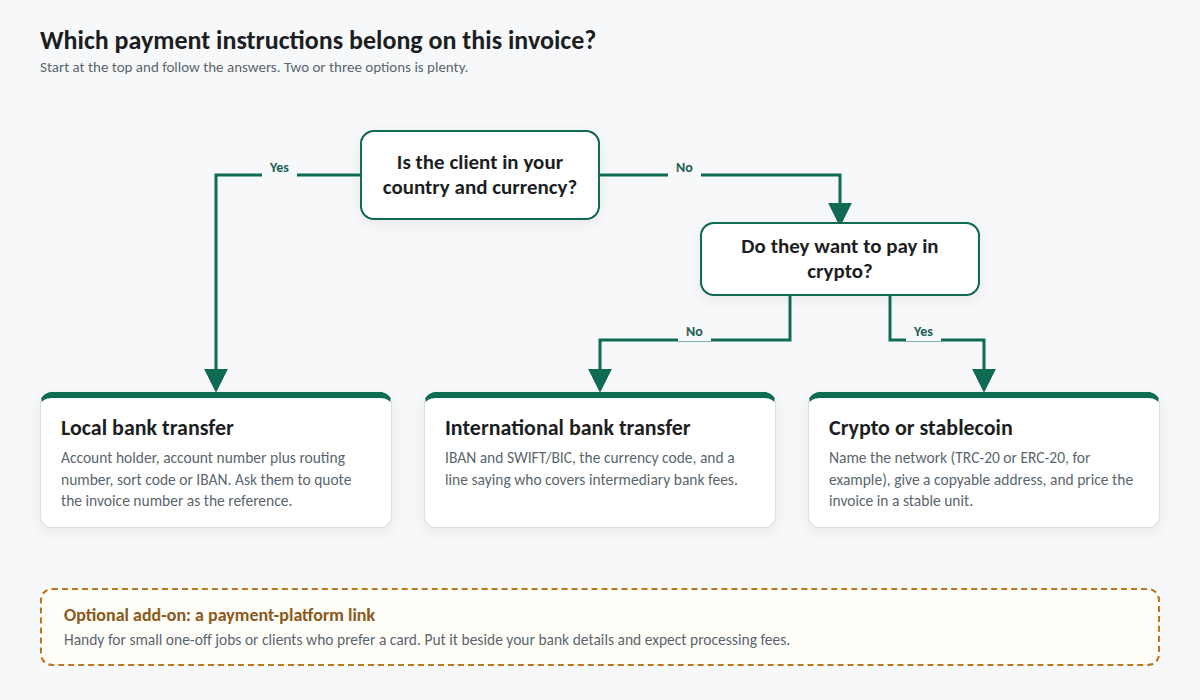
The invoice is only half the job. The other half is making payment effortless, and that means choosing a small number of methods and describing them precisely.
Bank transfer
Still the workhorse of business payments. Give the account holder's name, the bank, and the identifiers your client's bank needs: account number and routing number in the US, sort code and account number in the UK, IBAN in the eurozone, and SWIFT/BIC for international transfers. Ask the client to quote the invoice number as the payment reference. It lets you reconcile in seconds instead of guessing which invoice a lump sum covers.
Payment platforms and cards
A payment link lets a client pay by card in a minute, which suits small clients and one-off jobs. The trade-offs are processing fees, which are usually a percentage of the amount, and the possibility of chargebacks. If you use one, put the link in your payment instructions next to the bank details so the client can choose.
Crypto and stablecoins
For clients or freelancers who work in crypto, the invoice needs a little more care than a bank transfer. Name the network, not just the coin: USDT on TRC-20 and USDT on ERC-20 are different networks, and funds sent on the wrong one can be lost. List every wallet you accept, present addresses as copyable text so nobody retypes forty characters, and state which currency the invoice is priced in. Pricing in a stablecoin unit avoids the "what was the rate on Tuesday" argument that comes with a volatile asset. We wrote a full guide to crypto invoices with USDT and Bitcoin, and the tax treatment of receiving crypto varies by country, so check yours.
Keep the menu short
Two or three options is plenty. Each additional method adds reconciliation work for you and a decision for the client, and decisions slow payment down.
Deposits, milestones and part payments
For larger projects, do not wait until the end to invoice. Three common structures spread the risk on both sides:
- A deposit before work starts, often somewhere between 25% and 50% of the fee. It commits the client and covers your early costs.
- Milestone invoices, each tied to a deliverable the client can verify, such as "design approved" or "site live on staging."
- Retainers, a fixed amount billed on a schedule. Duplicate last month's invoice, update the date and number, and send.
When a deposit has been paid, show it on the final invoice as a deduction beneath the total, so the document reads "Total, less deposit received, balance due." Clients expect to read it that way, and it prevents the same money being requested twice. Invoice Studio handles this directly: record a deposit and the balance due appears under the total. Set out cancellation terms in your contract as well, such as a kill fee that covers the work done if the client cancels midway.
Payment terms, reminders and late payments
Most overdue invoices are not disputes. They are invoices that slipped through a busy person's day, got sent to the wrong inbox, or are waiting on an approval nobody knew was pending. That is good news, because the fix is usually a polite, prompt, specific message.
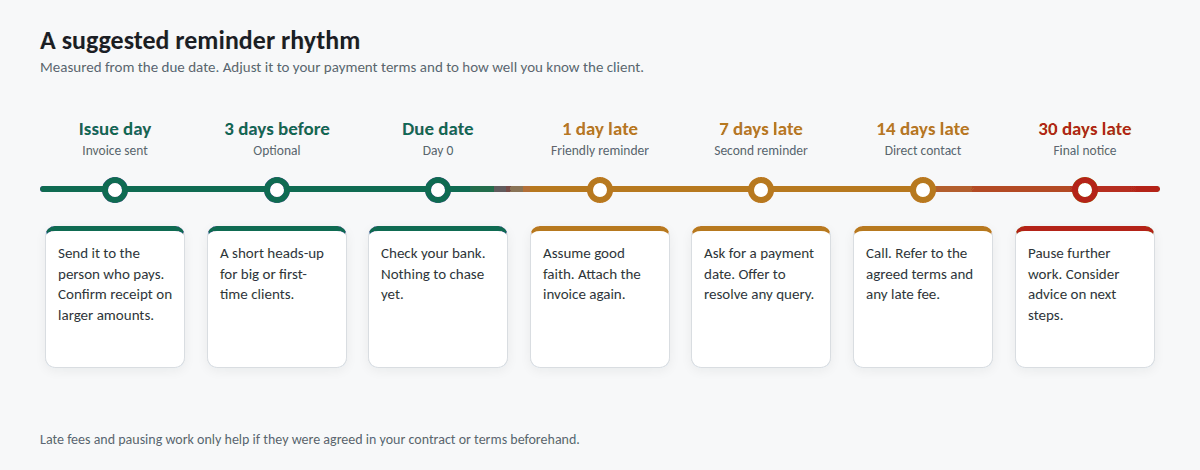
Prevention comes first: put the due date on the invoice, send it to the person who actually pays (confirm this once), include any required PO number, and ask for a quick acknowledgment on larger amounts. Then follow a predictable rhythm for reminders. Figure 4 shows one that works for most freelance and small-business relationships. Adjust it to your terms and to how well you know the client.
A friendly first reminder
Send this the day after the due date. Keep it short, assume good faith, and attach the invoice again.
Hi Sam, a quick note that invoice INV-2026-0042 for $4,212.00 was due on 26 March. I've attached a copy in case it got buried. If it's already in the payment run, ignore this, and if anything is holding it up, let me know and I'll sort it out. Thanks!
A firmer second reminder
If a week passes with no response, ask for something concrete: a payment date.
Hi Sam, following up on invoice INV-2026-0042, now seven days past its 26 March due date. Could you confirm when I can expect payment? The payment details are on the attached invoice. I'm happy to talk if there's a query on any line.
Late fees and pausing work
A late-payment fee or interest clause only works if it was agreed in advance, so put it in your contract or quote and mention it in the invoice terms. Some countries set statutory interest on late commercial payments, and the rules on what you can charge vary, so check locally before you rely on one. In practice, for smaller jobs, the more effective lever is often a contract clause that lets you pause work while an invoice is overdue. Stay courteous throughout: chasing an invoice is a normal part of running a business, not an accusation.
Choosing invoicing tools: spreadsheets, subscriptions and offline software
There are three broad ways to produce invoices, and each suits a different situation.
1. Word or spreadsheet templates
Free and flexible, and perfectly reasonable if you send a handful of invoices a year. The weaknesses show up as volume grows: numbering is manual, totals are only as reliable as your formulas, nothing remembers your clients, and every new invoice starts from a copy of an old one that may still contain last month's details.
2. Subscription invoicing services
Online invoicing services add real conveniences: automatic reminders, payment links, client portals, syncing across devices, and connections to accounting software. If you need those, paying for them is fair. The costs are ongoing fees (plans in the range of $15 to $29 a month are common), free tiers that often cap how many invoices you can send, and the fact that your client list and figures live on someone else's server. Our piece on invoice software without a subscription lays out the numbers and what a subscription still does better.
3. One-time-purchase offline software
You pay once, the software runs on your own computer, and your data stays there. Invoice Studio is built this way: a single HTML file, $70 once, no account, working with no internet connection. The honest trade-offs are that it creates the document rather than emailing it or chasing payments for you, and that backups are your responsibility. Figure 5 compares the cumulative cost over five years.
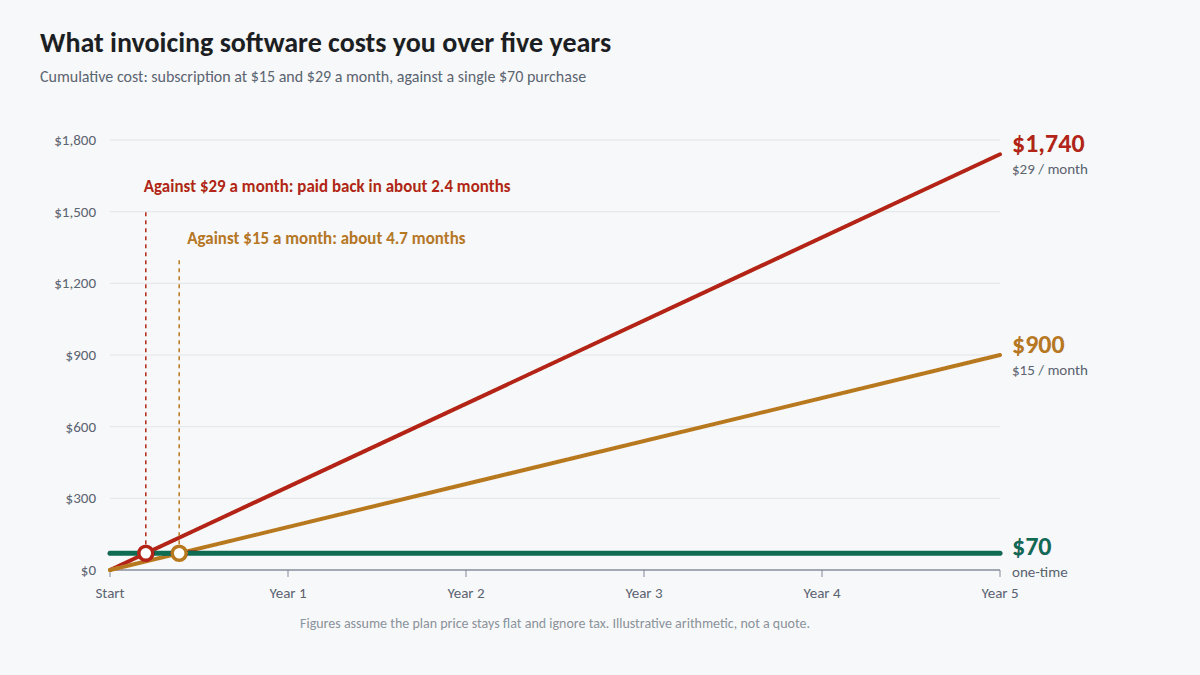
Against a $15 plan, the one-time price pays for itself in under five months; against a $29 plan, in under three. If you want the math in detail, see how one-time-payment invoice software works. Which route fits you depends on your situation:
- Freelancers billing a modest number of clients usually need clean documents, multiple currencies and a client list, not automation. See invoice software for freelancers.
- Small businesses with one or two people issuing invoices can work well from a single file, as explained in offline invoice software for small business, and can move to full accounting software when the volume justifies it.
- Anyone who dislikes creating accounts will appreciate a tool that needs none. See invoice generators without signup and the offline invoice generator guide.
Record keeping, backups and privacy
Every invoice you issue should be stored, along with the data that produced it. Retention rules differ by country and by document type, and several years is a common minimum, so check what applies to you and keep the records for at least that long. Practical habits:
- Save a PDF of every sent invoice in a folder organized by year. A PDF is a fixed record; an editable file can change without anyone noticing.
- Back up on a schedule. If your invoicing data lives locally, export a backup regularly and keep a second copy somewhere separate from your main computer.
- Export a summary for your accountant. A spreadsheet listing every document with its date, client and total makes year-end far quicker.
Invoices are also sensitive. They hold client names, addresses, project details, amounts and sometimes wallet addresses. Cloud services store all of that on their servers, which is convenient and comes with the usual questions about who can access it. Keeping the data on your own machine removes that third party entirely, at the cost of taking on the backups yourself, a trade-off we cover in private invoice software that keeps client data off someone else's server.
Your first invoice with Invoice Studio, step by step
Everything above applies whatever tool you use. Here is how it comes together in Invoice Studio, which is a good illustration of how little a professional invoice needs from software.
- Open the file. The download is one HTML file. Double-click it and it opens in your browser. There is nothing to install and no account to create, and it keeps working with the internet switched off.
- Add your business details and logo. Enter your name, address and tax number, upload a logo, then pick one of four templates (Classic, Modern, Compact or Typed) and one of eight accent colors.
- Add your client. Save their name, address and any reference numbers once. Next month, one click fills them back in.
- Set currency, language and tax. Choose from 150+ currencies, including crypto, and one of seven document languages. Tax can be off, a single rate, or set per line, with prices treated as tax-inclusive or tax-exclusive, the distinction we worked through earlier.
- Enter the line items. Use the specific descriptions from the line-items section, with quantities and rates. Totals calculate as you type.
- Add payment details. Include your bank information and, if you accept crypto, every wallet address. Addresses print as selectable text, so a client can copy one directly from the PDF.
- Record any deposit. The balance due appears under the total.
- Print to PDF. Use your browser's print dialog to save an A4 PDF. The README lists the three print settings that give the cleanest result.
- Back up. Export the JSON backup so you can move everything to a new computer, and use the CSV export to give your accountant a list of every document with its total.
For a retainer client, duplicate last month's invoice and change the number and date. It takes under a minute. One thing worth knowing: Invoice Studio produces the document, and you send the PDF yourself by email or however you normally do. If you want a tool that emails and chases automatically, that is the real advantage of a subscription service, and the choice comes down to whether you value that enough to pay for it every month. You can see a full live example of the invoice and every feature on the product page before deciding.
Ten invoicing mistakes that slow payment
- No due date. "Payable within 30 days" means different things to different people. Print the date.
- Vague line items. If the approver cannot tell what they are paying for, they will ask, and the invoice waits.
- Sending it to the wrong person. The hiring manager is often not the person who pays. Ask who receives invoices.
- Missing PO or reference numbers. Some companies will park or reject invoices that lack them.
- Inconsistent numbering. Duplicate or skipped numbers confuse your records and their system.
- Editing a sent invoice. Issue a credit note and a corrected invoice instead, so both sides keep a clean trail.
- Ambiguous dates and currencies. Write "12 Mar 2026" and "USD," not 03/12/26 and a bare dollar sign.
- Burying the payment details. Put them on the invoice, not in a follow-up email.
- Getting tax-inclusive and tax-exclusive mixed up. The totals will not match the quote, and the client will notice.
- Waiting to invoice. The longer you wait after delivery, the later you get paid, and the more the client's memory of the work fades.
Frequently asked questions
What must an invoice include?
At a minimum: your business name and contact details, your client's name and billing address, a unique invoice number, the issue date and due date, a description of the goods or services with quantities and prices, the total due in a stated currency, and how to pay. If you charge VAT, GST or a similar tax, add the rate, the tax amount and your tax registration number. Requirements vary by country, so check local rules.
What is the difference between an invoice and a receipt?
An invoice requests payment for work delivered. A receipt confirms that payment has been received. Many businesses mark the original invoice "paid" with the payment date and use that as the receipt.
How do I number invoices?
Use a unique, sequential scheme such as INV-2026-0001, never reuse a number, and keep quotes in a separate series. If you void an invoice, keep it in the sequence marked void rather than deleting it.
What payment terms should I use?
Due on receipt or Net 7 to Net 14 suits small jobs and new clients. Net 30 is a common default for companies. Agree the terms before work starts and write the due date as a calendar date on the invoice.
Should I invoice in my currency or my client's?
It decides who carries the exchange-rate risk. Invoicing in your currency puts the risk on the client; invoicing in theirs puts it on you. Choose deliberately, state the currency clearly, and use currency codes such as USD or CAD when a symbol could mean more than one currency.
What should I do when a client pays late?
Send a friendly reminder the day after the due date with the invoice attached, follow up after a week asking for a payment date, and escalate calmly if there is still no response. Late fees and pausing work only help if they were agreed in advance, so put them in your contract or terms.
Can I create professional invoices without a subscription?
Yes. Offline software such as Invoice Studio is a one-time $70 purchase that produces invoices, quotes and receipts with no account and no monthly fee. The trade-offs are that you send the PDFs yourself and manage your own backups.
One file. One payment. Every invoice you will ever send.
Invoice Studio: 150+ currencies including crypto, 7 languages, 4 templates, offline and private. Pay once, $70.
Buy Invoice Studio — $70